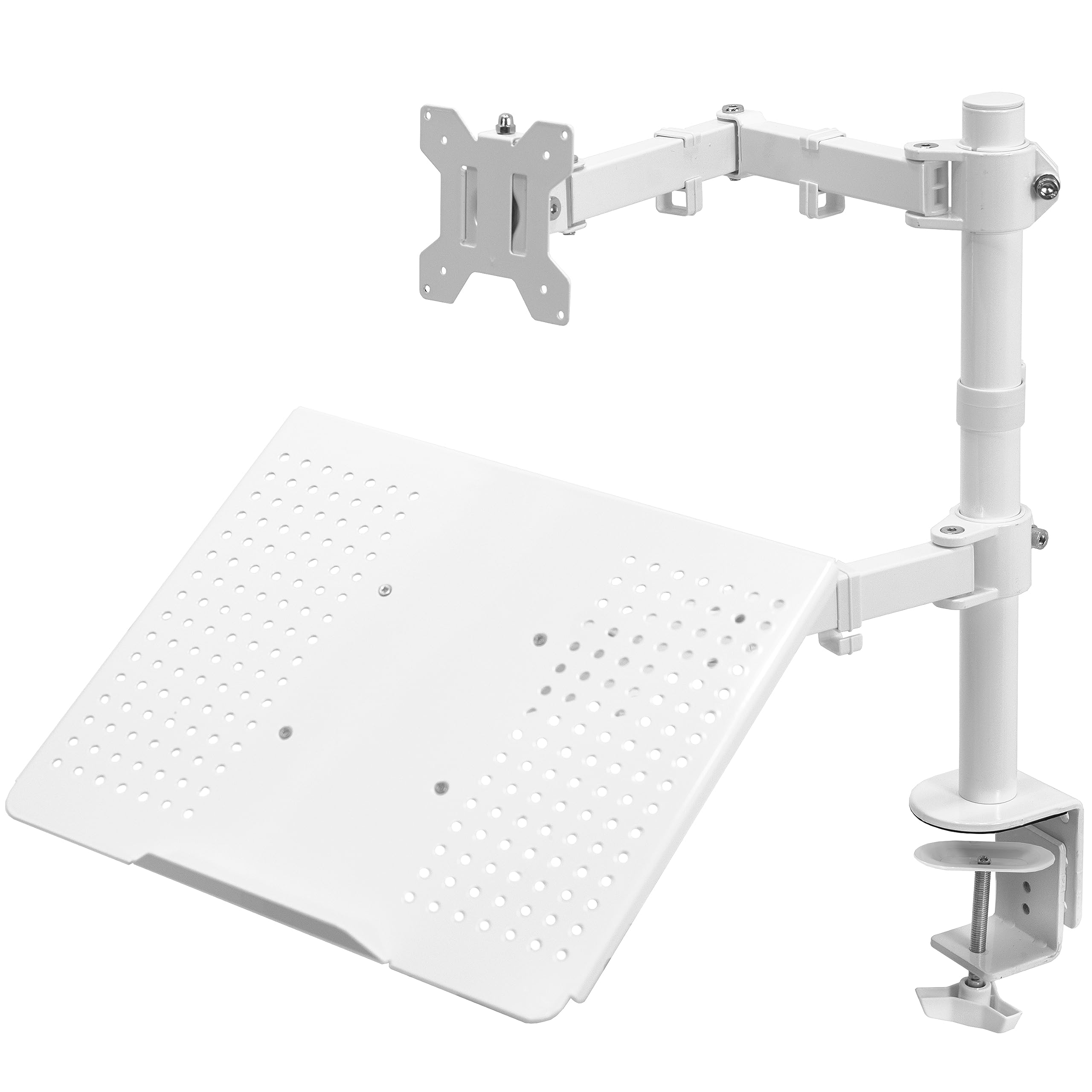
The VIVO Dual Screen Stand combines a monitor arm with a vented laptop tray, giving a two-device workspace without requiring a second monitor.
This VIVO Dual Screen Stand review looks at its fit, adjustment range, and mounting choices for buyers who want a monitor-and-laptop layout.
VIVO Dual Stand Review Summary
The quick verdict
3,000+ ratings
Read Amazon ReviewsVIVO Dual Screen Stand
A desk clamp mount for people who want an adjustable monitor alongside a laptop while keeping both devices off the main work surface.
- Supports one 13- to 32-inch monitor weighing up to 22 pounds, with 75x75mm or 100x100mm VESA mounting holes.
- Includes a vented laptop tray sized for laptops up to 17 inches.
- The monitor arm provides +15° to -15° tilt, 180° swivel, 360° rotation, and height adjustment along the center pole.
- The monitor can be positioned in portrait or landscape orientation.

Pros
- Combines a monitor mount and laptop tray in one desk setup.
- Supports a monitor up to 32 inches and a laptop up to 17 inches.
Consider before buying
- The monitor's 22-pound maximum and VESA pattern limit compatibility, so check both before purchase.
- The laptop tray is sized for devices up to 17 inches; buyers should confirm that their laptop fits its usable surface.
Read the full review summary
This stand is designed for a monitor up to 32 inches and a laptop up to 17 inches, with a separate support for each.
Its monitor arm offers tilt, swivel, rotation, and height adjustment along the center pole, so the screen can be repositioned for portrait or landscape viewing.
The laptop tray makes the combination useful for a primary display plus a laptop used for notes, calls, or a second work surface.
The clamp-based installation keeps a freestanding base off the desk, and the included cable clips can help route power and AV cords along the arm and pole.
It is a particularly relevant option for a compact workstation where a monitor and laptop need distinct positions.
Before buying, check the monitor's weight and VESA pattern, laptop dimensions, desk edge and thickness, and whether a clamp or grommet installation suits the desk.
The buying factors
VIVO Dual Stand Scorecard
Editorial scores reflect listed features and buyer fit; they are not laboratory measurements or customer ratings.
Monitor compatibility
Supports 13- to 32-inch monitors up to 22 pounds, provided the display has a 75x75mm or 100x100mm VESA pattern.
Laptop integration
The vented tray supports laptops up to 17 inches, making the combined monitor-and-laptop arrangement the stand's defining advantage.
Screen adjustment
Tilt, 180-degree swivel, 360-degree rotation, and pole height adjustment allow a range of viewing positions.
Mounting flexibility
It offers a heavy-duty C-clamp for surfaces up to 3.4 inches thick and an optional grommet mount for surfaces up to 3 inches thick.
Desk organization
Mounting the two devices and routing cables with detachable clips can clear some surface area, though the stand still occupies space at the desk edge or grommet.
Setup convenience
Detachable VESA plates and included assembly hardware are intended to simplify installation; buyers still need to confirm their equipment and desk fit.
Key Features and Specifications of VIVO Dual Stand
- Supports one 13- to 32-inch monitor weighing up to 22 pounds, with 75x75mm or 100x100mm VESA mounting holes.
- Includes a vented laptop tray sized for laptops up to 17 inches.
- The monitor arm provides +15° to -15° tilt, 180° swivel, 360° rotation, and height adjustment along the center pole.
- The monitor can be positioned in portrait or landscape orientation.
- Attaches with a C-clamp to a surface up to 3.4 inches thick; an optional grommet mount supports surfaces up to 3 inches thick.
- Detachable cable clips on the arm and center pole help organize power and AV cables.
- Detachable VESA plates and assembly hardware are included; the stand has a three-year warranty.
Pros and Cons of VIVO Dual Stand
Pros
- Combines a monitor mount and laptop tray in one desk setup.
- Supports a monitor up to 32 inches and a laptop up to 17 inches.
- Provides several useful monitor adjustments, including full rotation for portrait or landscape placement.
- Clamp and grommet mounting options can accommodate different desk layouts.
- Cable clips and detachable VESA plates support a more organized installation process.
Consider before buying
- The monitor's 22-pound maximum and VESA pattern limit compatibility, so check both before purchase.
- The laptop tray is sized for devices up to 17 inches; buyers should confirm that their laptop fits its usable surface.
- Installation depends on having a suitable desk edge or grommet location within the listed thickness limits.
- Its monitor tilt range is +15° to -15°, which may not suit buyers who need a wider tilt adjustment.
Who Should Buy VIVO Dual Stand?
Good fit
Consider this stand if your intended setup pairs one monitor with a laptop and you want both devices supported from the desk mount.
The tray can keep the laptop available as a second screen or work surface while the monitor serves as the main display.
It also suits buyers who prefer a clamp or grommet attachment over a monitor stand with a broad desktop base.
Check your monitor's weight, VESA hole spacing, and screen size, then compare your laptop's dimensions with the tray's 17-inch maximum. Measure the desk surface at the planned mounting point as well.
These checks matter because equipment compatibility and mounting clearance determine whether the combined arrangement will work in your workspace.
Who should skip it
Skip this model if you need support for two separate monitors; its documented layout is one monitor and one laptop tray.
Also look elsewhere if your monitor exceeds the listed size or weight limits, lacks the supported VESA pattern, or your desk cannot accommodate either mounting option.
How the VIVO Dual Stand Fits a Monitor-and-Laptop Desk
A practical two-device arrangement
The stand is built around a specific combination: a monitor on an articulating arm and a laptop on a vented tray.
That arrangement can help users keep a larger display and their laptop within the same work zone without relying on a second monitor arm.
It is less suited to a conventional dual-monitor setup because the second position is a tray rather than a VESA mount.
Adjustment for the main display
The monitor can tilt through a 30-degree total range, swivel 180 degrees, rotate fully, and move in height along the center pole.
Those movements allow a buyer to orient the display vertically or horizontally and adjust its position for the workstation.
If frequent downward or upward tilting is central to your setup, consider whether the stated tilt range is enough for your preferred viewing angle.
Desk fit and attachment
The C-clamp is specified for surfaces up to 3.4 inches thick, while the optional grommet mount is specified for surfaces up to 3 inches thick.
Measuring the desk at the precise mounting point helps avoid surprises from a thick edge or limited clearance underneath.
The clamp approach also places the mount at the desk edge, so consider where it will sit relative to nearby walls, drawers, and other equipment.
Compatibility before purchase
The monitor must fall within the size and weight limits and use one of the two supported VESA patterns.
The tray is intended for laptops up to 17 inches, but buyers should still check the device's physical footprint against the space they want to use.
Confirming those dimensions in advance is more useful than relying on screen size alone, particularly when the laptop has a wide chassis or the monitor has an unusual rear layout.
Alternatives to VIVO Dual Stand
Computer Monitor Arms alternative
60,000+ ratings
Read Amazon ReviewsVIVO Dual Monitor Desk Mount STAND-V002
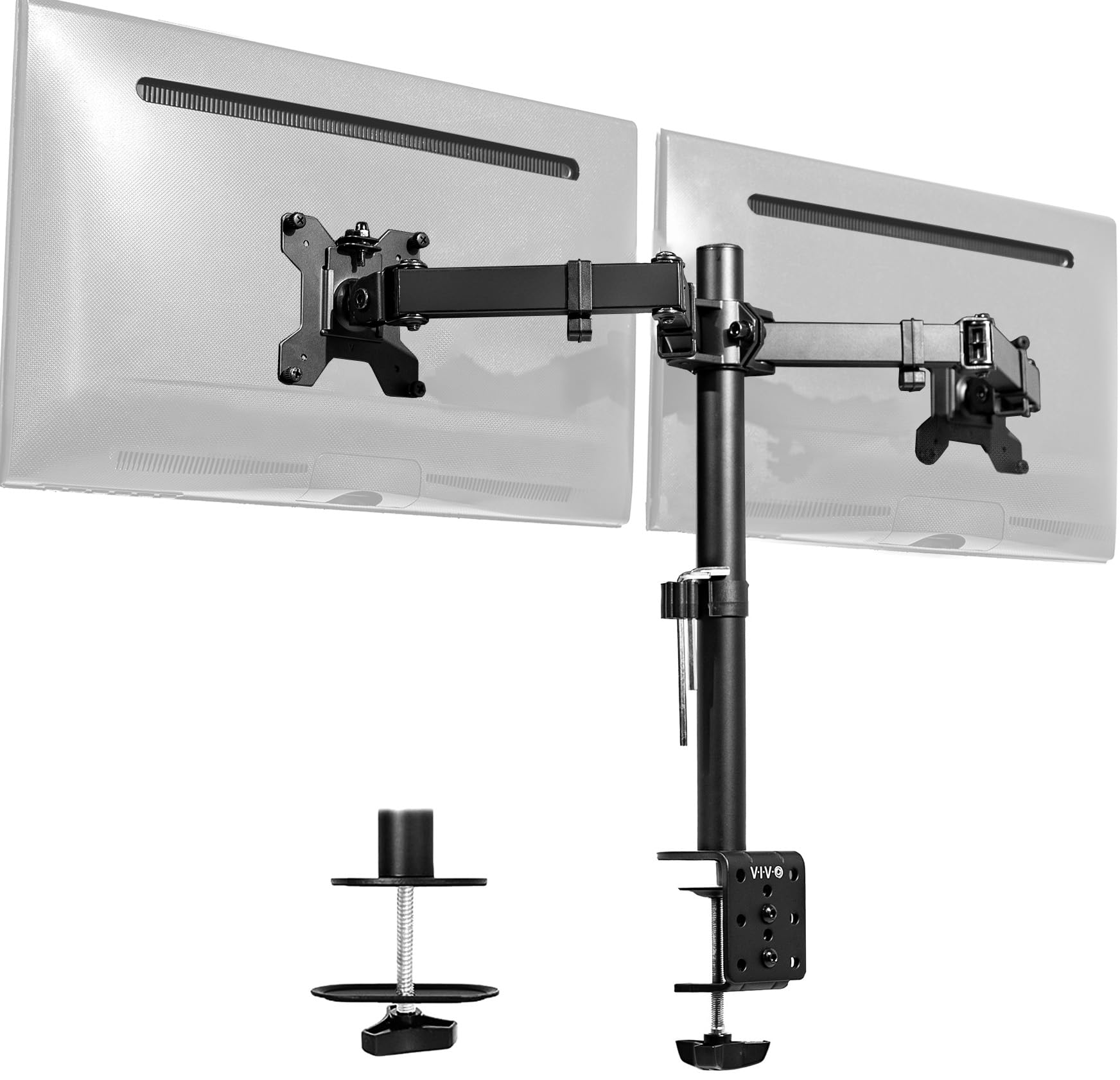
Choose the Dual Screen Stand for a monitor-plus-laptop arrangement. The STAND-V002 is the more direct fit when you want two VESA-mounted monitors and do not need a laptop tray.
- This VIVO mount supports two monitors from 13 to 30 inches, up to 22 pounds each, and provides tilt, swivel, rotation, and center-pole height adjustment.
- It attaches with a C-clamp or optional grommet mount.
- The VIVO Dual Screen Stand pairs one monitor arm with a laptop tray, supporting a monitor up to 32 inches and a laptop up to 17 inches.
Computer Monitor Arms alternative
2,000+ ratings
Read Amazon ReviewsVIVO AeroPoise Dual Monitor Stand
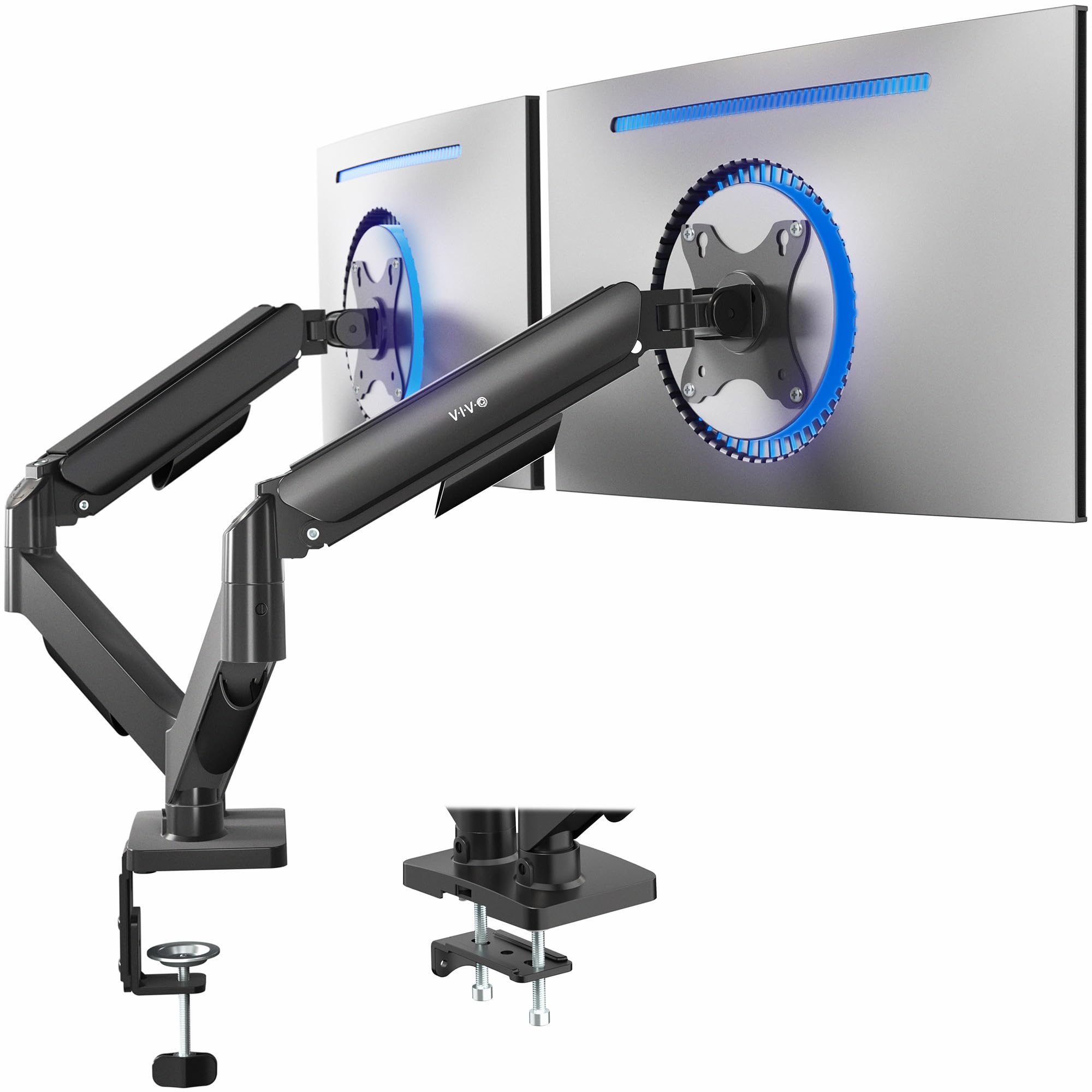
Pick the Dual Screen Stand when you want a laptop supported beside your monitor. The AeroPoise is a better match if you have two compatible monitors and want spring-assisted positioning for both.
- The AeroPoise supports two monitors from 17 to 32 inches and 4.4 to 19.8 pounds each.
- Its mechanical spring adjustment and articulating arms provide tilt, swivel, and rotation; the mount uses a C-clamp or bolt-through grommet.
- The VIVO Dual Screen Stand uses one monitor arm and a laptop tray, with a monitor limit of 22 pounds and 32 inches.
Is VIVO Dual Stand Worth It?
The VIVO Dual Screen Stand is worth considering for a desk setup built around one monitor and one laptop.
Its adjustable monitor arm, laptop tray, cable clips, and clamp or grommet installation address that specific combination in a single mount.
Confirm the monitor's VESA pattern, size, and weight, the laptop's fit on the tray, and the desk thickness at the mounting point before choosing it.
If those checks line up and the monitor's tilt range meets your needs, it is a practical candidate for consolidating a two-device workspace.
Your review at a glance
3,000+ ratings
Read Amazon ReviewsVIVO Dual Screen Stand
A desk clamp mount for people who want an adjustable monitor alongside a laptop while keeping both devices off the main work surface.
- Supports one 13- to 32-inch monitor weighing up to 22 pounds, with 75x75mm or 100x100mm VESA mounting holes.
- Includes a vented laptop tray sized for laptops up to 17 inches.
- The monitor arm provides +15° to -15° tilt, 180° swivel, 360° rotation, and height adjustment along the center pole.
- The monitor can be positioned in portrait or landscape orientation.